

Qgis
There are several ways to add NIMBO data to QGIS.
Open QGIS and open your Data Source Manager. Go to the XYZ tab.
Click on “New” to add a new XYZ server.
Enter a TMS URL.
Click “Add” and enjoy !
WMS / WMTS
Section titled “WMS / WMTS”Open QGIS and open your Data Source Manager. Go to the WMS/WMTS tab.
Click on “New” to add a new WMS/WMTS server.
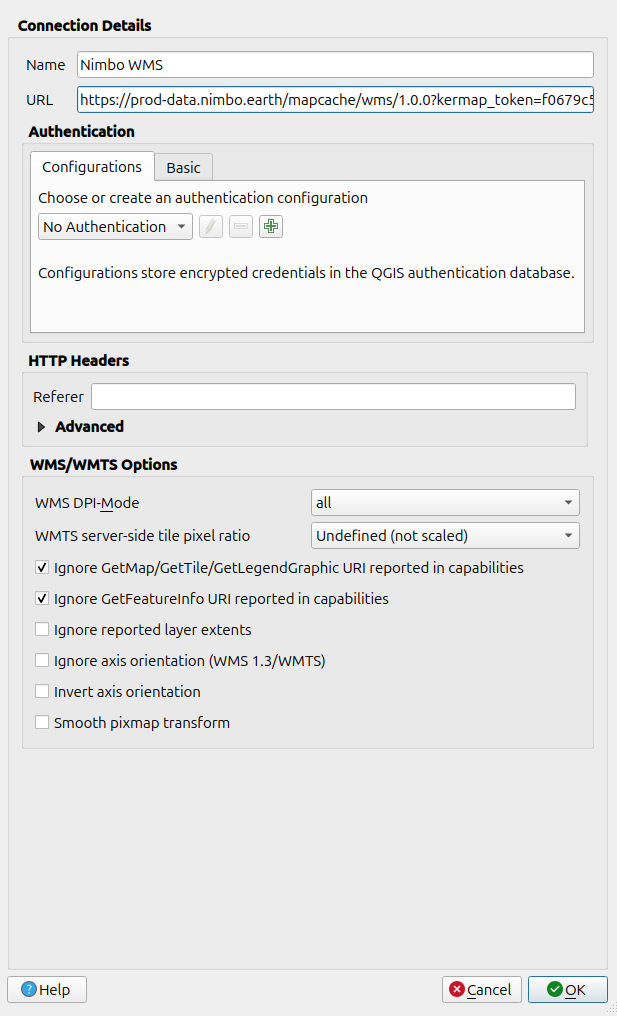
If you want to add a WMS, use the URL :
https://prod-data.nimbo.earth/mapcache/wms/1.0.0?kermap_token=<YOUR_TOKEN>If you want to add a WMTS, use the URL :
https://prod-data.nimbo.earth/mapcache/wmts/1.0.0/WMTSCapabilities.xml?kermap_token=<YOUR_TOKEN>Then make sure, you checked the options :
- Ignore GetMap/GetTile/GetLegendGraphic URI reported in Capabilities
- Ignore GetFeatureInfo URI reported in Capabilities
You should have something looking like this :
Click “OK” then “Connect”.
You should have something looking like this :
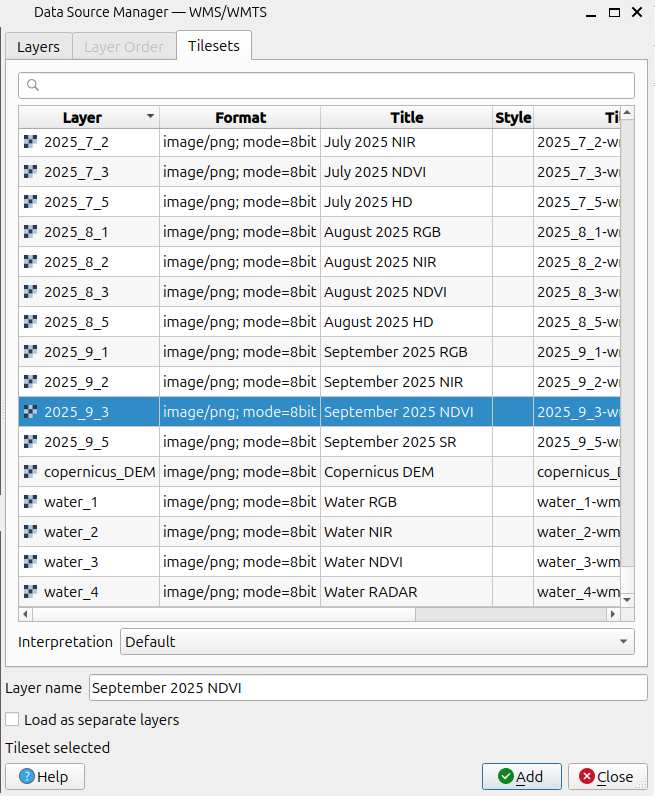
Choose the layer you want to add and click “Add”. Enjoy your data !